 Vela Rewards
User Enrollment
Learn how to enroll users into the Vela rewards program and manage user accounts.
Overview
User enrollment is the foundational step that connects your customers to the Vela rewards program. When you enroll a user, you're creating a link between their account in your system and their Vela profile.
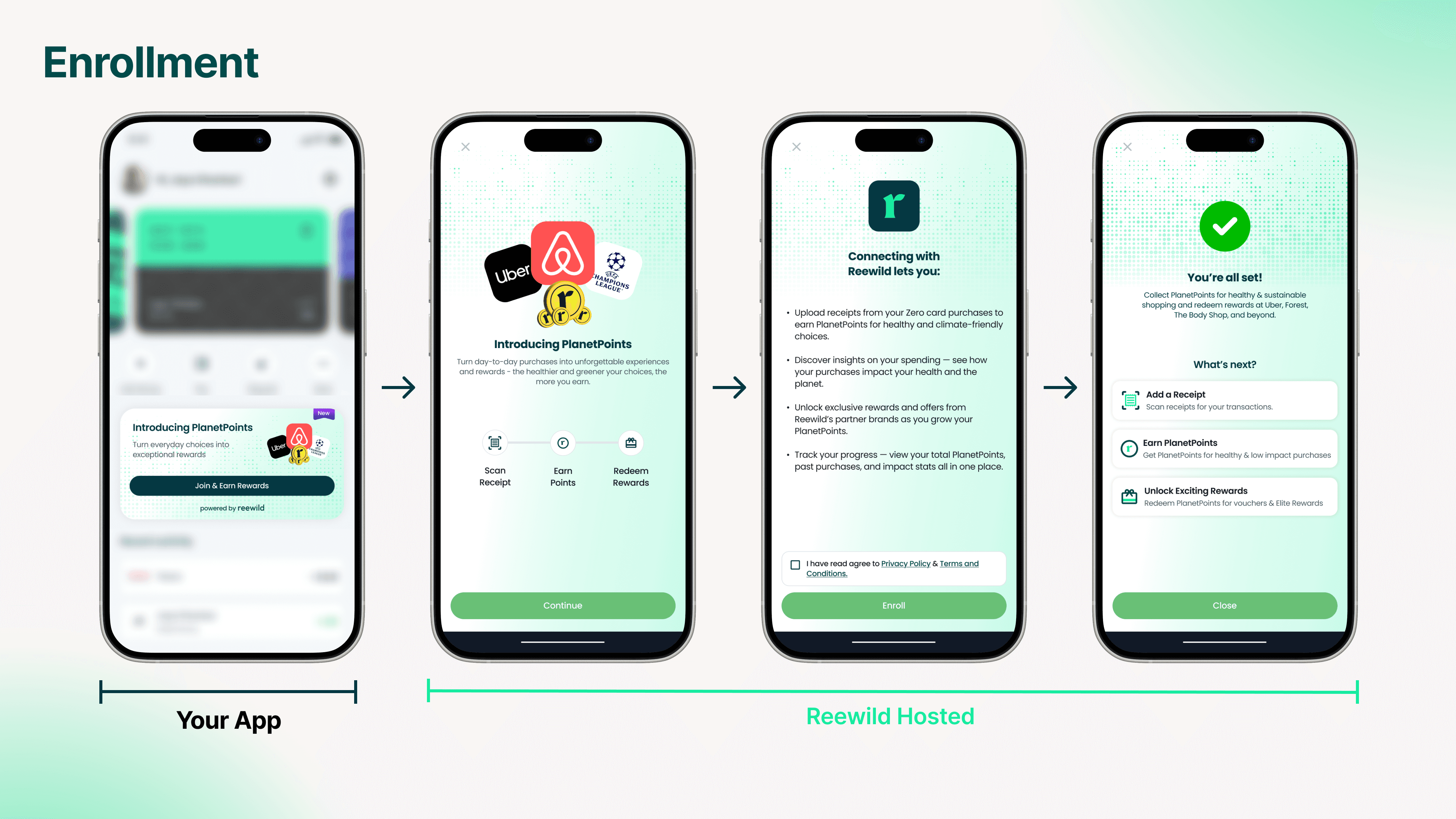
This one-time process enables users to:
- Earn Vela Points on sustainable purchases
- Upload receipts and track their environmental impact
- Access sustainability insights
Enrollment Options
Vela provides two enrollment methods depending on your integration preference:
Option 1: Direct API Enrollment
Use the /users/enroll endpoint to enroll users directly from your backend.
Best for: Applications that want full control over the enrollment UI and flow.
Option 2: Hosted Enrollment Page
Use the /users/enroll/session endpoint to create a session and redirect users to Vela's hosted enrollment page.
Best for: Applications that want a quick integration without building custom UI.
Flow:
- Call the session endpoint with user details
- Redirect user to the returned URL
- User completes enrollment on Vela's branded page (showing your app logo)
- User is redirected back to your app via the deep link you configured
Required vs. Optional Fields
Required Fields
| Field | Type | Description |
|---|---|---|
email | String | User's email address |
firstName | String | User's first name |
lastName | String | User's last name |
Optional Fields
| Field | Type | Description |
|---|---|---|
imageUrl | String (URL) | User's profile picture |
country | String | User's country |
city | String | User's city |
postalCode | String | User's postal code |
Location data improves receipt validation and enables region-specific features.
Understanding User IDs
When you successfully enroll a user, the system generates a unique userID:
- Use in all API calls: Pass this ID when uploading receipts, retrieving stats, etc.
- Store securely: Map this ID to your internal user records
- Permanent: This ID remains consistent throughout the user's lifecycle
Success Response
When enrollment succeeds, you receive:
{
  "user": {
    "userID": "USR-24A91C",
    "email": "alex.lee@example.com",
    "lifetimePoints": 0,
    "availablePoints": 0,
    "numOfTransactions": 0,
    "totalCarbonScore": 0,
    "totalGreenProducts": 0,
    "createdAt": "2025-02-14T10:22:31Z",
    "updatedAt": "2025-02-14T10:22:31Z"
  }
}
After successful enrollment:
- Store the
userIDin your database - Guide users to upload their first receipt
Error Responses
| Status Code | Error | How to Handle |
|---|---|---|
201 | Created | User successfully enrolled |
400 | Invalid parameters | Validate input before sending request |
401 | Unauthorized | Check your API credentials |
500 | Internal server error | Retry with exponential backoff |
Monitoring Enrollments
You can monitor user enrollments in real-time through the developer portal:
- View detailed logs of enrollment activities
- Track timestamps and event types
- Debug failed enrollments